Takabet Android APK and iOS Application Setup Guide: Mobile Download Manual

Mobile smartphones have completely transformed how Bangladeshi players engage with sports betting and digital casino entertainment. Today, over ninety percent of all gaming activity in Bangladesh takes place on mobile devices powered by Android and iOS. While mobile web browsers provide functional access, a dedicated native application delivers unmatched speed, lower latency for in-play cricket odds, direct access to mobile financial services cashiers, and optimized battery and data performance across local cellular networks.
Because international real-money gaming applications are restricted from standard domestic app storefronts like the Google Play Store due to regional licensing frameworks, the official Takabet mobile application is distributed directly via an Android Application Package (APK) for Android users, and an advanced Progressive Web App (PWA) for Apple iOS users.
This comprehensive technical handbook provides detailed, step-by-step instructions for downloading, installing, verifying, and configuring the official mobile application safely on your smartphone or tablet.
Technical Specifications and Hardware Compatibility
Before downloading the installation package, verify that your smartphone or tablet satisfies the minimum technical criteria required for smooth, responsive performance:
Android Device Specifications
- Operating System: Android 6.0 (Marshmallow) or higher (fully optimized for Android 10, 11, 12, 13, and 14).
- Hardware Processor (CPU): Minimum 1.5 GHz Quad-Core processor (compatible with Snapdragon, MediaTek Helio, Dimensity, and Unisoc chipsets).
- System RAM: Minimum 2 GB of RAM (3 GB or 4 GB strongly recommended for smooth live dealer video streaming and multi-tab sports betting).
- Free Storage Space: Minimum 100 MB of free internal storage to download and install the package, plus 200 MB of space for game assets and cache files.
- Network Compatibility: 3G, 4G LTE, 5G, and Wi-Fi networks (minimum 3 Mbps connection recommended for live in-play sports odds; 5 Mbps for HD live casino streams).
- Supported Manufacturers: Xiaomi, Redmi, POCO, Samsung, Realme, Vivo, Oppo, OnePlus, Motorola, Tecno, Infinix, and Symphony.
Apple iOS Specifications
- Operating System: iOS 12.0 or higher (compatible with iPhone 8 through iPhone 15/16 series, iPad, and iPod Touch).
- Native Browser: Apple Safari (WebKit engine).
- Storage Requirement: Approximately 50 MB of available storage for web app cache and offline assets.

Official Takabet Mobile APK (Verified 2026 Package)
Step-by-Step Android APK Installation Manual
Installing an external APK package on an Android smartphone requires enabling specific system permissions. Modern Android operating systems automatically safeguard users by requiring manual consent before installing apps from outside the Google Play Store.
Follow this verified installation walkthrough to configure and launch the application safely:
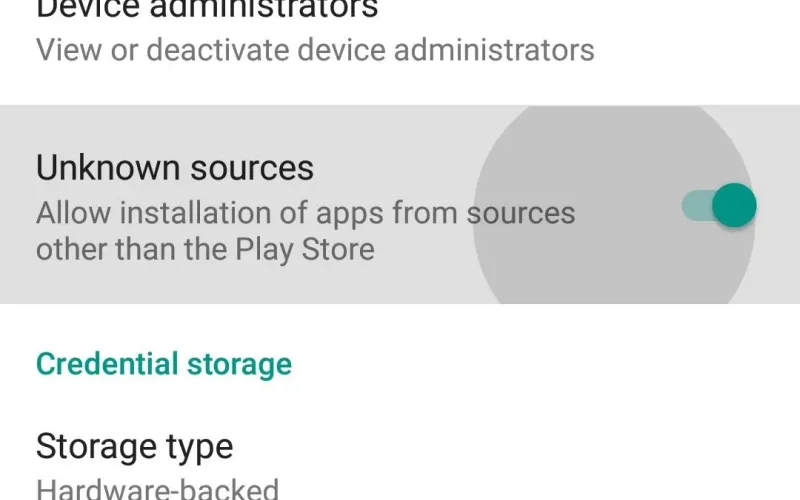
Step 1: Enabling Installation from Unknown Sources
To permit your mobile web browser to install the downloaded file:
- Open the Settings app on your Android smartphone.
- Navigate to the Security, Privacy, or Apps & Notifications section (the exact menu title varies depending on your manufacturer's interface, such as Xiaomi HyperOS/MIUI, Samsung One UI, or Realme UI).
- Select Special App Access or Install Unknown Apps.
- Locate the specific web browser you use to download files (such as Google Chrome or Samsung Internet).
- Tap on the browser and toggle the switch to Allow from this source (or "Permit app installs").
- Note for Android 10 and newer: You do not need to enable a global setting for the entire phone; Android will simply ask you to confirm permission when you tap the downloaded file.
Step 2: Downloading the Official Package
- Launch your mobile browser and navigate to the official portal via our Takabet Platform Directory or Official Login Mirror.
- Locate the Mobile App or Download App button located in the top navigation bar or promotional carousel.
- Tap the Download for Android button to begin the download. The package file is typically named
takabet_official_vX.X.apkand is approximately 30 MB to 45 MB in size. - Your browser will display a standard security prompt stating: "This type of file can harm your device. Do you want to keep takabet.apk anyway?" This is a universal automated prompt shown for every single direct APK download outside the Play Store. Confirm by tapping OK or Download Anyway.
Step 3: Installing the Application Package
- Once the download finishes (typically within 10 to 20 seconds on 4G or broadband), swipe down from the top of your screen to open your notification drawer and tap the completed download alert. Alternatively, open your phone's File Manager app and navigate to the Downloads folder.
- Tap on the downloaded APK file. A system installer dialog box will appear displaying the official app icon and permissions list.
- Tap the Install button in the lower-right corner.
- The system installer will extract the application packages and conduct an automated security scan.
- Once installation completes, tap Open to launch the platform immediately, or tap Done to return to your home screen, where the official app icon is now active.
Setting Up the Application on Apple iOS (iPhone and iPad)
Because Apple’s iOS ecosystem restricts direct installation of external executable packages, the platform uses an advanced Progressive Web App (PWA) framework. A PWA delivers identical performance to a native app—featuring a dedicated home screen launcher icon, full-screen display without browser toolbars, hardware-accelerated rendering, and biometric security.
Follow these simple steps to configure the iOS app on your Apple device:
- Open the native Safari browser on your iPhone or iPad (PWA installation requires Safari; third-party browsers like Chrome for iOS cannot install home screen PWAs).
- Navigate to the verified mobile portal using our Official Login Mirror.
- Tap the Share button located in the center of the bottom navigation bar (a square icon with an upward-pointing arrow).
- Scroll down through the action list and select Add to Home Screen.
- A confirmation window will appear showing the application title and official icon. You can retain the default name "Takabet" or customize it.
- Tap Add in the top-right corner.
- Close Safari and return to your home screen. You will now see the official app icon. Tapping it opens the platform in standalone full-screen mode with ultra-fast asset caching and zero browser clutter.
Core Advantages of the Dedicated Mobile Application
Using the dedicated mobile application provides distinct functional and performance benefits compared to general mobile web browser navigation:
Ultra-Low Latency In-Play Betting
During fast-moving T20 cricket matches in leagues like the BPL and IPL, odds shift with every single delivery. The mobile application maintains a persistent, lightweight WebSocket data stream directly to the odds engine. This eliminates the latency of browser page reloads, ensuring you can place in-play wagers at current prices without frustrating bet rejections.
Seamless Mobile Financial Services Cashier
The mobile app is optimized for seamless switching between local mobile banking apps and the gaming cashier. When funding your account with bKash or Nagad, you can copy merchant numbers, switch to your banking app to complete the transaction, copy your Transaction ID (TrxID), and return to the gaming app without your session resetting or reloading.
Biometric Security Integration
You can activate fingerprint authentication or facial recognition (Face ID) within the mobile application settings. This allows for secure, instant one-touch login while ensuring your account balance remains protected if your smartphone is temporarily handled by family members or friends.
Significant Mobile Data Savings
For players operating on metered mobile data packages from Grameenphone, Robi, or Banglalink, the app stores core game interfaces, card graphics, and layout templates locally in your smartphone's internal cache memory. Rather than re-downloading visual assets on every page view, the app only transmits lightweight data packets for odds and numbers, reducing mobile data consumption by up to 60%.
Performance Optimization and Troubleshooting on Budget Smartphones
Many players in Bangladesh utilize budget-friendly smartphones from brands like Xiaomi, Realme, or Symphony with 2 GB or 3 GB of RAM. Follow these optimization techniques to ensure smooth, lag-free gameplay:
Resolving "App Not Installed" Errors on Android
If your Android system displays an "App Not Installed" error message during setup:
- Clear Internal Storage: Ensure your device has at least 200 MB of free internal memory. Delete temporary videos, unneeded downloads, or clear app caches.
- Remove Conflicting Older Versions: If you previously installed an older or unofficial APK version, go to Settings > Apps, uninstall the older app completely, restart your phone, and install the new package.
- Re-Download Over a Stable Connection: A momentary network dropout during download can corrupt the installation archive. Delete the file from your Downloads folder and download a fresh copy over stable Wi-Fi or strong 4G.
Eliminating Stutter on Live Casino Video Streams
If live dealer tables (such as Live Baccarat or Crazy Time) experience buffering or frame drops:
- Open the video player settings inside the live game window and switch the video quality from "High Definition" to "Auto" or "Medium."
- Close heavy background applications (such as Facebook, YouTube, TikTok, or photo editors) before launching the live casino stream to free up available RAM.
- Ensure battery-saving modes on your phone are not aggressively throttling processor speeds during gaming sessions.
Managing App Cache and Storage
Over several months of active play, cached slot graphics and audio files can accumulate in your phone's memory. To refresh performance:
- Open Settings > Apps > Takabet.
- Select Storage & Cache.
- Tap Clear Cache (avoid tapping "Clear Data" unless you are comfortable re-entering your login credentials). This clears temporary files and restores fluid interface speeds without affecting your account balance.
Mobile Security Hygiene and Player Protection
Your smartphone holds your personal communications, financial wallets, and gaming accounts. Maintaining rigorous mobile security hygiene is vital:
- Download Exclusively from Official Channels: Never install APK packages shared via unofficial Telegram groups, WhatsApp forwards, or obscure third-party download directories. These packages may be tampered with to include intrusive adware or credential-stealing keyloggers. Always verify download links through our Takabet Platform Overview.
- Secure Your Smartphone: Always maintain a secure screen lock (PIN, password, or fingerprint) on your mobile device.
- Disable "Unknown Sources" After Setup: Once the application is installed, you can return to your device settings and disable "Install Unknown Apps" for your browser for enhanced ongoing security.
- Practice Responsible Gaming: Mobile applications make gaming accessible 24/7, which can make it easier to lose track of time or spending. Always establish strict session limits, never gamble with essential funds, and consult our Responsible Gaming Policy to maintain healthy personal boundaries.